Save your licensed EA file
Download the EA/EX4 file supplied by FX Pro Robots and keep it in a secure folder. Do not rename, modify or share the licensed file.
Privacy Policy
Thank you for visiting our website. This privacy policy tells you how we use personal information collected at this site. Please read this privacy policy before using the site or submitting any personal information. By using the site, you are accepting the practices described in this privacy policy. These practices may be changed, but any changes will be posted and changes will only apply to activities and information on a going forward, not retroactive basis. You are encouraged to review the privacy policy whenever you visit the site to make sure that you understand how any personal information you provide will be used. Note: the privacy practices set forth in this privacy policy are for this website only. If you link to other websites, please review the privacy policies posted at those sites.
Collection of Information. We collect personally identifiable information, like names, email addresses, etc. when voluntarily submitted by our visitors. The information you provide is used to fulfill your specific request. This information is only used to fulfill your specific request, unless you give us permission to use it in another manner, for example, to add you to one of our mailing lists
Terms and Disclaimer. CFTC rule 4.41: Hypothetical or simulated performance results have certain limitations. Unlike an actual performance record, simulated results do not represent actual trading. Also, since the trades have not been executed, the results may have under-or-over compensated for the impact, if any, of certain market factors, such as lack of liquidity. Simulated trading programs in general are also subject to the fact that they are designed with the benefit of hindsight. No representation is being made that any account will or is likely to achieve profit or losses similar to those shown.
Forex Auto Trading has large potential rewards, but also large potential risks. You must be aware of the risks and be willing to accept them in order to invest in the Forex market.
Don't trade with money you can't afford to lose. This ad/presentation is neither a solicitation nor an offer to trade Forex. No representation is being made that any account will or is likely to achieve profits or losses similar to those discussed in this ad/presentation. The past performance of any trading system or methodology is not necessarily indicative of future results.
Forex Auto Trading is a challenging and potentially profitable opportunity for educated and experienced investors. However, before deciding to participate in Forex Auto Trading, you should carefully consider your investment objectives, level of experience, and risk appetite. There is considerable exposure to risk in any foreign exchange transaction. Any transaction involving currencies involves risks including, but not limited to, the potential for changing political and/or economic conditions that may substantially affect the price or liquidity of a currency.
The leveraged nature of Forex trading can magnify the effect of market movements on your deposited funds, both favourably and unfavourably. You could lose all of your initial margin funds, your position could be liquidated, and you remain responsible for resulting losses. Investors may use orders such as stop-loss and limit orders as part of their risk-management approach.
FXProRobots.com and the authors of the FX Pro Robots Expert Advisors and strategies accept no responsibility for the reliability or accuracy of the information in this presentation.
The content provided is put forward in good faith and believed to be accurate, however, there are no explicit or implicit warranties of accuracy or timeliness made by FxProRobots.com.
FX PRO ROBOTS and its management and employees assume no responsibility for errors, inaccuracies, or omissions in these materials. They do not warrant the accuracy or completeness of the information, text, graphics, links, or other items contained within these materials.
FX Pro Robots, its management and its employees shall not be liable for special, indirect, incidental or consequential damages, including lost revenue or profits, arising from these materials. You are responsible for ensuring that you may legally purchase and use our products under applicable laws. We cannot be held responsible for damages or legal claims arising from such regulations. Publishing signals generated by our EAs on other websites or services is prohibited because the trading logic is our intellectual property.
Refund Policy
A full refund is available within the first 30 days after purchase if the balance drawdown on your live account exceeds 50%, provided that you used our recommended settings and supply proof of this.
Methods of Delivery. We deliver our products electronically by email.
After payment, email ONLY your MT4 account number to FX Pro Robots Support at support@fxprorobots.com. We will prepare your license and the information needed to get started.
It may take up to 3 business days to deliver our products to our customers.
We sometimes put a hold on delivery to make sure the transaction is legitimate.
Cookie/Tracking Technology. The Site may use cookie and tracking technology depending on the features offered. Cookie and tracking technology are useful for gathering information such as browser type and operating system, tracking the number of visitors to the Site, and understanding how visitors use the Site. Cookies can also help customize the Site for visitors. Personal information cannot be collected via cookies and other tracking technology; however, if you previously provided personally identifiable information, cookies may be tied to such information. Aggregate cookie and tracking information may be shared with third parties.
Distribution of Information.
We may share information with governmental agencies or other companies assisting us in fraud prevention or investigation. We may do so when: (1) permitted or required by law; or, (2) trying to protect against or prevent actual or potential fraud or unauthorized transactions; or, (3) investigating a fraud that has already taken place. The information is not provided to these companies for marketing purposes.
We reserve the right to make changes to this policy. Any changes to this policy will be posted.
Technical conditions. FX Pro Robots Expert Advisors are designed to follow the developer’s trading logic on your account. Execution and results can vary with broker and market conditions. Some protected EAs cannot be backtested on historical data. An FX Pro Robots EA license is bound to the supplied MetaTrader 4 account number, has no time limit (lifetime access), and cannot be transferred to a different account number.
Reference minimum account balance: USD 200 per 0.01 lot. Do not publish your EA or account information on third-party websites or share them with anyone who may attempt to compromise the protected file.
Install your licensed EA/EX4 file with this clear step-by-step guide. Before you begin, confirm the required currency pair, timeframe and MT4 account number for your license.
Download the EA/EX4 file supplied by FX Pro Robots and keep it in a secure folder. Do not rename, modify or share the licensed file.
In MetaTrader 4, select File → Open Data Folder. This opens the correct directory for the terminal you are currently using.
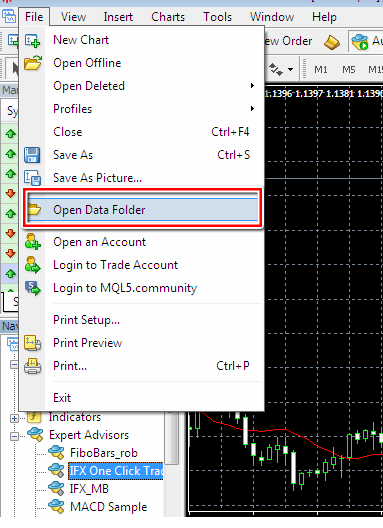
Open MQL4 → Experts and paste the EA/EX4 file into the Experts folder. Indicators and scripts should only be placed in their matching folders.
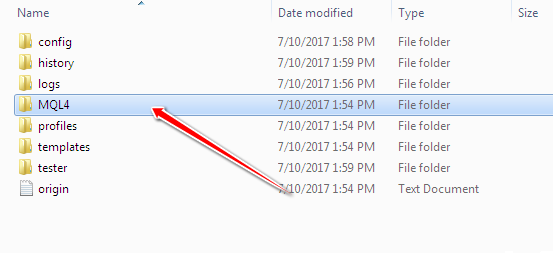
Restart MT4, or open the Navigator, right-click Expert Advisors and choose Refresh. Your EA should now appear in the list.
Open Tools → Options → Expert Advisors and allow automated trading according to the EA requirements.
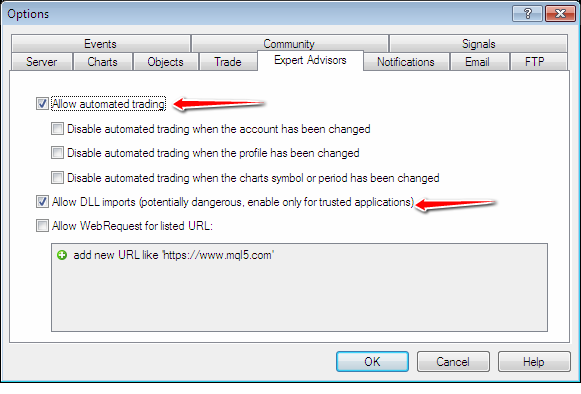
Open the specified currency pair and timeframe. Drag the EA from the Navigator onto the chart, review its inputs and enable Allow live trading.
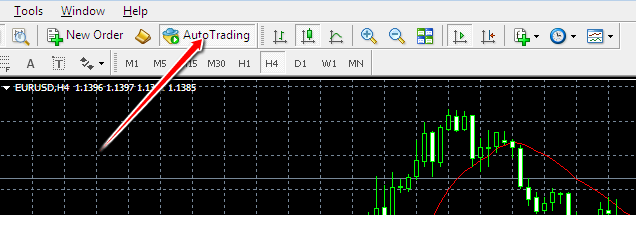
Check the EA status in the upper-right corner of the chart and review the Experts and Journal tabs for messages. Test the setup on a demo account before live trading.