We have developed trading algorithms and guidelines intended to limit adverse effects.
Trading accounts
Works on demo and live accounts. Reference balance: USD 200 per 0.01 lot.
MetaTrader 4 only
FX Pro Robots Expert Advisors require a MetaTrader 4 brokerage account.
DEFAULT SETTINGS
Use the default money management settings or adjust them to suit your risk limits. Review each input before changing the configuration.
MT4 FOREX EXPERT ADVISOR
FX Pro Diamond Robot_2.0: strategy, live results and licensing
FX Pro Diamond Robot_2.0 evaluates EURJPY H1 through proprietary mathematical calculations rather than delayed indicator signals. Review public monitoring and the linked historical test before selecting a lifetime license.
MT4PlatformFX BLUEPublic monitoringLIFETIMELicense options24/5Product support
STRATEGY FOCUS
Mathematical trading models
Automated market analysis and execution according to programmed trade-management rules.
TRANSPARENCY
EURJPY H1 optimization
Use the connected FX Blue profile and the original backtest link to inspect the available performance evidence.
FX Pro Diamond
Robot_2.0
Meet
FXProRobots.com
WORK
ONE LICENSE, ONE PAYMENT
AFTER PAYMENT, THERE ARE NO
ADDITIONAL LICENSE FEES
FOR THE PURCHASED PACKAGE.
NO MONTHLY LICENSE CHARGES OR HIDDEN PRODUCT FEES.
EACH ALGORITHM IS DEVELOPED FOR ITS INTENDED MARKET CONDITIONS.
WE USE HISTORICAL TESTING AND PUBLIC MONITORING
TO EVALUATE EACH STRATEGY’S BEHAVIOUR.
REVIEW THE EVIDENCE FOR OUR
EXPERT ADVISORS
FX Pro Diamond
Robot_2.0
A Mathematical Trading System for EURJPY
FX Pro Diamond Robot_2.0 is a mathematical Expert Advisor in the FX Pro Robots product line.
Developed for EURJPY on the H1 timeframe, this trading system uses mathematical models and market-structure analysis to identify trading opportunities.
Unlike conventional Forex robots that depend on lagging
indicators, FX Pro Diamond Robot_2.0 operates without the use of any
technical indicators.
The system analyses raw market data directly rather than relying on signals from conventional technical indicators.
The core of FX Pro Diamond Robot_2.0 is built around
proprietary mathematical algorithms refined through extensive historical
testing and real-market optimization.
These algorithms evaluate price behaviour, volatility, momentum and market dynamics to identify entry and exit conditions.
Why FX Pro Diamond Robot_2.0?
✓ Advanced
Mathematical Algorithms
The system uses mathematical price calculations rather than conventional technical indicators to analyse the market.
✓ Indicator-Free
Trading Logic
No moving averages, RSI, MACD, or other lagging
indicators. The robot focuses exclusively on market data and price
behavior.
✓ Optimized
for EURJPY H1
Designed specifically for the EURJPY currency pair on H1.
✓ Intelligent
Trade Management
Every position is managed automatically according to
built-in risk control mechanisms and dynamic market conditions.
✓ Fully
Automated Operation
Once installed, the robot continuously monitors the
market and executes trades without manual intervention.
✓ Professional
Performance
Built for traders seeking a robust automated solution
based on mathematics rather than conventional indicator signals.
Trading Philosophy
Most Expert Advisors rely heavily on indicators that are
derived from past price movements.
By the time an indicator generates a signal, a
significant portion of the market move may already be completed.
FX Pro Diamond Robot_2.0 takes a different approach.
The system evaluates the market directly through
proprietary mathematical calculations, allowing it to identify
opportunities based on current market conditions rather than delayed
indicator signals.
This creates a cleaner, more responsive trading
methodology that adapts naturally to changing price action.
Mathematical Technology. Automated Execution.
FX Pro
Diamond Robot_2.0 represents the culmination of years of development,
testing, and optimization.
It is designed for traders
who want a sophisticated automated trading solution built around
advanced mathematics, intelligent market analysis, and fully
automated execution.
Experience the next
generation of Forex automation with FX Pro Diamond Robot_2.0.
Not Based on Indicators. Built on Mathematics. Powered by Precision. FX
Pro Diamond
Robot_2.0💎
Choose settings with the EA’s rules and account risk in mind.
LIVE ACCOUNT RESULTS
FX Pro Diamond
Robot_2.0
24/5 SUPPORT
IF YOU HAVE A QUESTION, OUR TEAM IS
READY TO HELP.
WE WILL ANSWER YOUR PRODUCT QUESTIONS
AND PROVIDE SUPPORT
BY EMAIL.
FREE FUTURE UPDATES
AFTER PURCHASE, YOU WILL
RECEIVE ALL FUTURE PRODUCT UPDATES.
Strategy Tester Report
FX Pro Diamond Robot_2.0 Backtest
EURJPY H1 — open the complete historical test report.
FOREX BACKTESTING
SOFTWARE IS A PROGRAM THAT USES HISTORICAL DATA TO
RECREATE
THE BEHAVIOR OF TRADES AND THEIR REACTION TO A TRADING STRATEGY.
THE
RESULTING DATA IS USED TO MEASURE AND OPTIMIZE THE EFFECTIVENESS OF A
GIVEN
STRATEGY BEFORE APPLYING IT TO REAL MARKET CONDITIONS.
BACKTESTING EVALUATES A STRATEGY USING HISTORICAL DATA AND SELECTED ASSUMPTIONS.
RESULTS DEPEND ON DATA QUALITY, MODELLING SETTINGS AND TRADING COSTS.
PAST PERFORMANCE DOES NOT GUARANTEE FUTURE RESULTS.
PLAN YOUR TRADING APPROACH
LEARN. TEST. REVIEW. | PLAN YOUR NEXT STEP.
EACH ALGORITHM IS DEVELOPED FOR ITS INTENDED MARKET CONDITIONS.
Get your copy now
PRICE FX Pro Diamond Robot_2.0
Basic Package $139 / Lifetime
1 Live Account
1 Demo Account
100% automated trading
Lifelong license
Free upgrades and support
Install your licensed EA/EX4 file with this clear step-by-step guide. Before you begin, confirm the required currency pair, timeframe and MT4 account number for your license.
01
Save your licensed EA file
Download the EA/EX4 file supplied by FX Pro Robots and keep it in a secure folder. Do not rename, modify or share the licensed file.
02
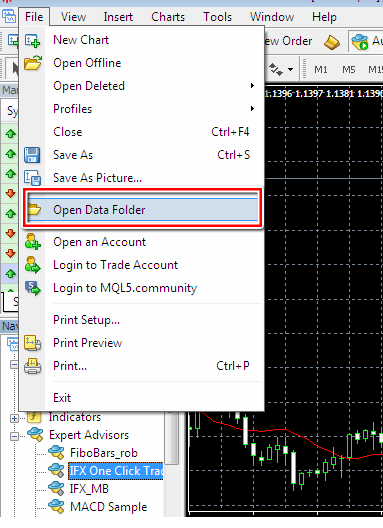
Open the MT4 Data Folder
In MetaTrader 4, select File → Open Data Folder. This opens the correct directory for the terminal you are currently using.
MT4: File → Open Data Folder
03
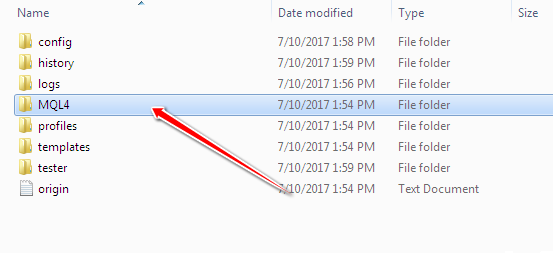
Copy the EA to MQL4/Experts
Open MQL4 → Experts and paste the EA/EX4 file into the Experts folder. Indicators and scripts should only be placed in their matching folders.
Destination folder: MQL4 → Experts
04
Refresh the Navigator
Restart MT4, or open the Navigator, right-click Expert Advisors and choose Refresh. Your EA should now appear in the list.
05
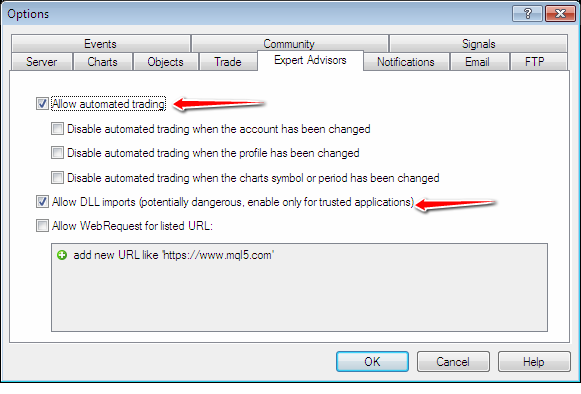
Enable algorithmic trading
Open Tools → Options → Expert Advisors and allow automated trading according to the EA requirements.
Review the Expert Advisor permissions before launch
06
Attach the EA to the correct chart
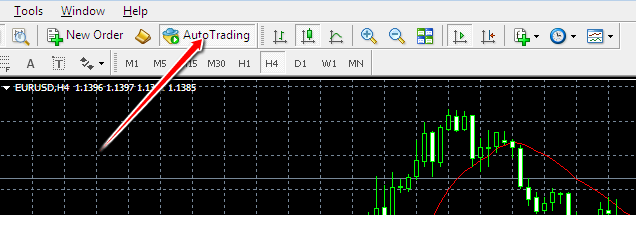
Open the specified currency pair and timeframe. Drag the EA from the Navigator onto the chart, review its inputs and enable Allow live trading.
The AutoTrading button must show as enabled
07
Confirm that the EA is running
Check the EA status in the upper-right corner of the chart and review the Experts and Journal tabs for messages. Test the setup on a demo account before live trading.